
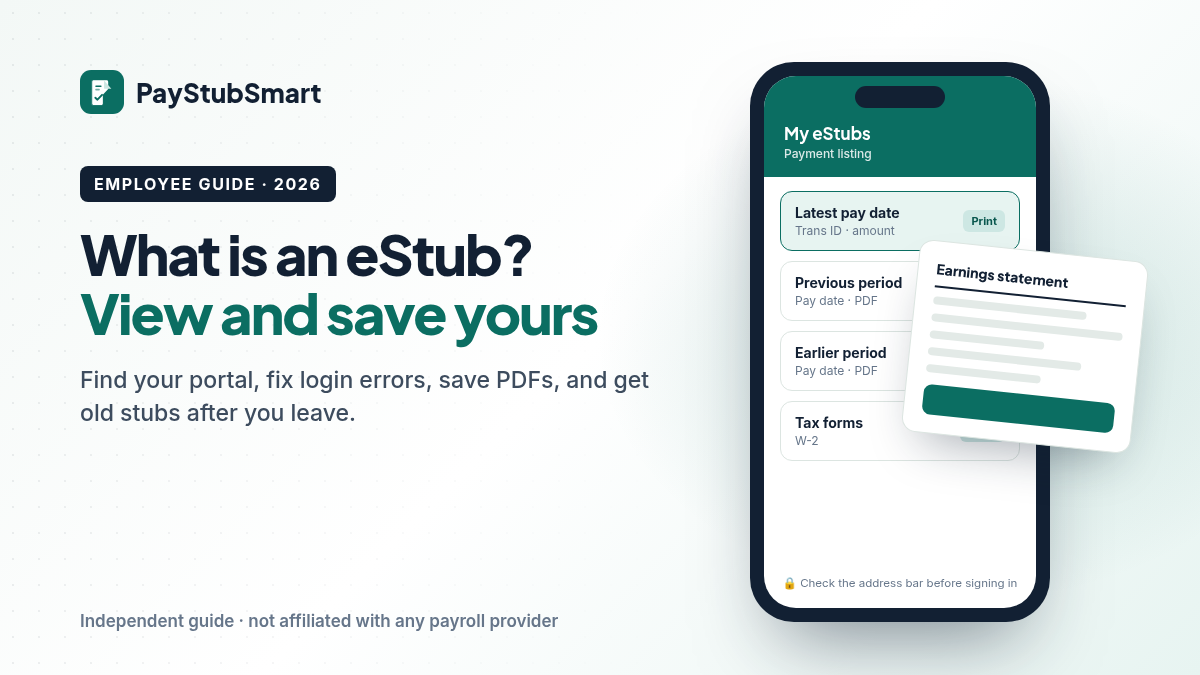
What Is an eStub? How to View and Print Yours (2026)
Short answer
An eStub is an electronic pay stub: the pay record your employer posts online instead of handing you paper. If your employer uses PaperlessPay, yours is at my-estub.com. Click a pay date’s Trans ID, then the printer icon, and choose Save as PDF. Your starting login comes from your employer, not from the portal.
What is an eStub?
It’s your pay stub in digital form. It lists the same gross pay, deductions, taxes withheld and net pay a paper stub would, but you open it in a portal or an app.
The word has two meanings, and that’s where most confusion comes from. People use “eStub” for any electronic pay statement. “my-eStub” is also the name of one specific portal, my-estub.com, run by PaperlessPay Corporation of Jacksonville, Florida. Employers that sign up with PaperlessPay post their staff’s stubs and tax forms there. If your employer isn’t a PaperlessPay client, you won’t have an account on that site, however many times you try.
Can my employer stop giving me paper stubs?
In most cases, yes, within your state’s rules. Federal law doesn’t require a pay stub at all. The U.S. Department of Labor says the Fair Labor Standards Act requires accurate pay records but not stubs, so the details come from state law. Two examples:
- New York: electronic wage statements are allowed, but the state labor department says workers must be able to view them on a computer the employer provides and print a copy.
- California: the labor commissioner’s 2006 opinion letter accepts electronic statements when employees can still choose paper and can print them at no cost.
If you work in a state with rules like these and can’t get to your eStub, ask payroll for a paper copy.
Which portal has my eStub?
Look at something you already have: the sender of your “pay statement available” email or text, the name in the footer of an old stub, or your onboarding packet. That name tells you where to go.
| The name you see | Where to go | Who fixes your login |
|---|---|---|
| my-eStub or PaperlessPay | Type my-estub.com yourself and choose Employee Portal | Your employer issues the first login. PaperlessPay chat unlocks accounts |
| “eStub” at an HCA or HealthTrust job | The link in your HR portal. HealthTrust sends former staff to onlinewagestatements.com/parallon2 | Your employer’s payroll team |
| ADP, Paychex, Workday, UKG or similar | The sign-in page your HR team gave you | Your employer’s HR or payroll team |
| Dollar General | Money Network’s Pay Stub Portal. See our Dollar General pay stub guide | Dollar General’s Employee Resource Center |
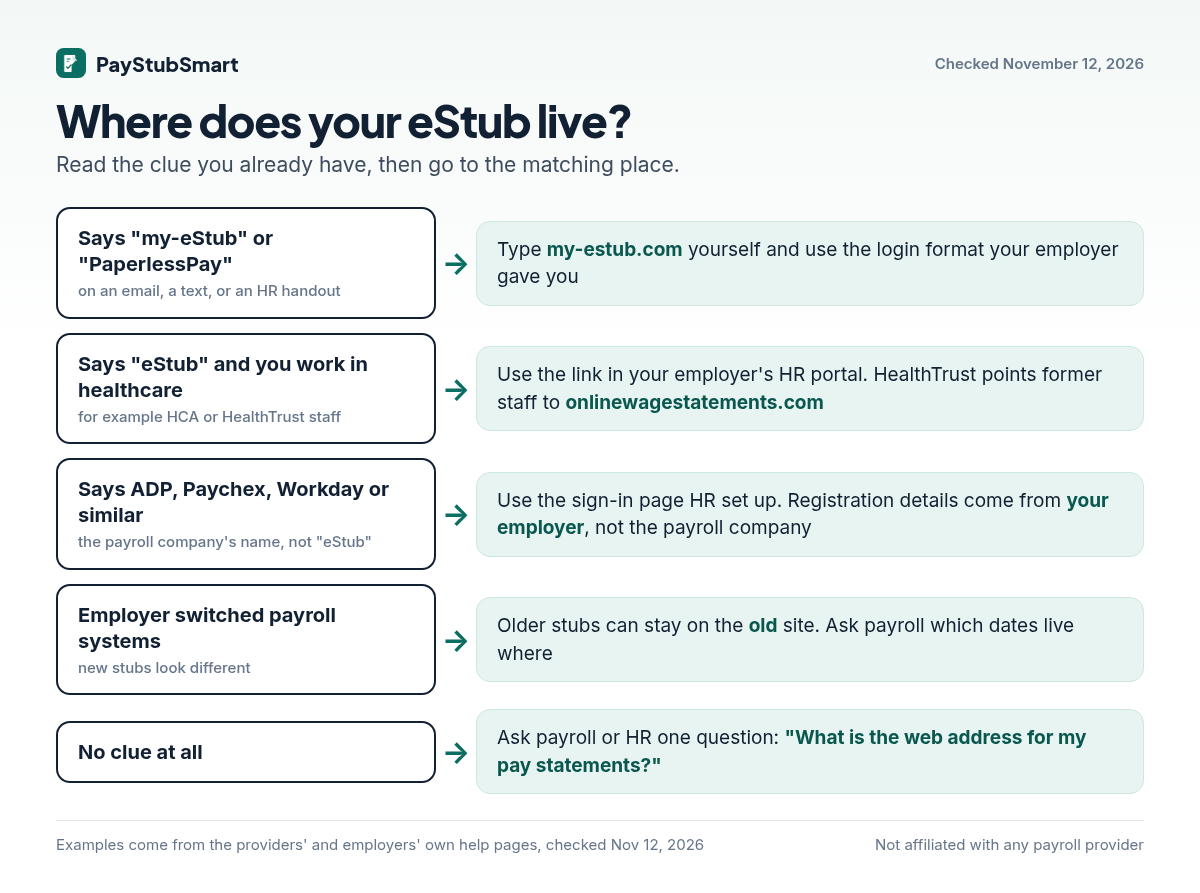
If some pay dates are missing, check whether your employer changed payroll systems. Old stubs don’t always move to the new one. When FirstHealth moved its payroll to ADP, its staff instructions said stubs from before January 28, 2021 would stay on the E-Stub site. Ask payroll which dates are stored where.
How do I log in to my-eStub the first time?
Sign in with the starting User ID and default password your employer gave you, then complete a short one-time setup.
- Type my-estub.com into the address bar and click Employee Portal in the top-left corner.
- Enter your User ID exactly the way your employer formats it. Many build it from a company code, your employee number and the first four letters of your first name, all in capitals. One employer’s guide gives TIG1234567JOHN as an example. The default password is case-sensitive.
- Replace the default password with your own and choose two security questions.
- Pick a delivery option. Depending on your employer, you can get an alert when a stub is posted, a password-protected PDF by email, or key figures by text.
Just hired? PaperlessPay says your account is only created after your first direct deposit. If you get an “invalid” message before your first payday, you haven’t typed anything wrong. Wait for that deposit, then try again.
Why won’t my eStub login work?
It’s usually one of six causes, and each one has its own fix. Find what you see in the left column.
| What happens | Likely cause | What to do |
|---|---|---|
| “Information is invalid” | Caps Lock, a User ID typo, or you’re on PaperlessPay’s demo site (red lettering under the eTools logo) | Re-type the User ID exactly as your employer formats it, with Caps Lock off, on the live Employee Portal |
| Account locked | Five wrong attempts in a row | Ask PaperlessPay chat to unlock it: Mon–Thu 9 a.m.–4 p.m., Fri 9 a.m.–3 p.m. Eastern |
| Password field clears with no error | Your browser or security software is blocking the site | Add my-estub.com as an allowed site, close the browser, then try again |
| Recover Password does nothing | No email address on your account | Use chat, or ask HR. Some employers say not to use it for a first login |
| Clicking a Trans ID opens nothing | A pop-up blocker | Allow pop-ups for my-estub.com |
| A figure on the stub is wrong | PaperlessPay shows exactly what payroll sent | Ask your payroll department to correct it. The portal can’t change it |
How do I print or save an eStub as a PDF?
Open the stub from Payment Listing by clicking its Trans ID. Click the printer icon at the top right, then choose Save as PDF instead of a printer.
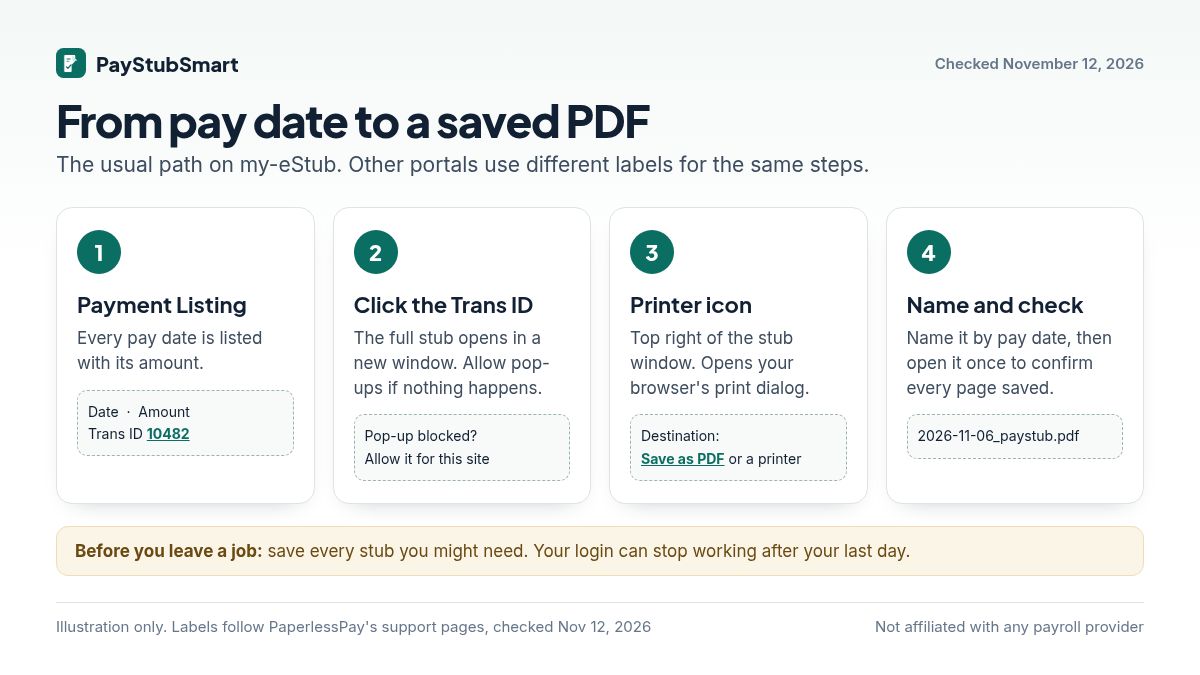
- On Windows, if “Save as PDF” isn’t offered, choose Microsoft Print to PDF.
- If the printout comes out garbled, PaperlessPay says some versions of Internet Explorer can’t print through its viewer. Use Chrome or Firefox instead.
- Name each file by pay date, for example 2026-11-06.pdf, so they sort in order when a lender asks for “the last two months.”
- Don’t edit a saved stub, not even to fix a typo. Ask payroll to issue a corrected one. An altered stub given to a lender or landlord can be treated as fraud.
Where are my W-2 and 1095 on my-eStub?
They’re under Tax Forms. That tab only appears after you agree to receive tax forms online.
To agree, go to User Setup. Under Online Usage Options, click Click Here for W2 and Tax Form Use, then verify your SSN.
PaperlessPay didn’t invent this extra step. IRS rules say an employer can deliver a W-2 electronically only to an employee who has agreed to it, and has to mail paper to everyone else. The notice you agree to must also say when electronic delivery ends, for example when you leave the job. So if you never agreed, expect your W-2 in the mail, not on the portal.
How do I get old eStubs after I leave a job?
Try your old login first. If it fails, ask your former employer’s payroll department in writing for the exact pay dates you need. The records are your employer’s, not the portal’s.
- Save before you go. We found no general rule on how long portal access lasts after your last day. Each employer decides.
- Some employers keep access open. HealthTrust, for example, sends former staff to its eStub site for old stubs and W-2s. It also mails a paper W-2 for the year your job ended.
- California workers have a deadline on their side. Labor Code section 226 gives current and former employees the right to copies of their pay records. The employer must provide them within 21 calendar days of the request, which can be written or spoken. It may charge only the actual cost of copying.
What should the request say?
“I worked here as [job title] from [start date] to [end date], employee ID [number]. Please send copies of my pay statements for pay dates [first date] through [last date] to [email or mailing address]. I no longer have access to the online pay portal.”
Keep a copy of what you sent and the date you sent it. That’s your proof if you have to follow up.
What does an eStub prove compared with a W-2?
An eStub shows what you earned and what was withheld in one pay period, plus running year-to-date totals. A W-2 is your employer’s official yearly report to the IRS, and it’s what you file your taxes with.
Don’t expect your last stub’s year-to-date gross to match Box 1 of your W-2. IRS instructions say Box 1 leaves out elective deferrals such as 401(k) or 403(b) contributions, while your stub’s gross includes them. A gap the size of your retirement contributions is normal, not an error.
For bank statements, IRS transcripts and employment verification checks, see which document proves what in our Dollar General guide. The chart there applies to any employer.
Are you the one paying the wages, say to a nanny or a caregiver? You can put together a stub for wages you’ve actually paid in your browser and download the PDF at no cost. It’s for your own payroll records, not for recreating a statement from someone else’s employer.
How can I tell a fake eStub email from a real one?
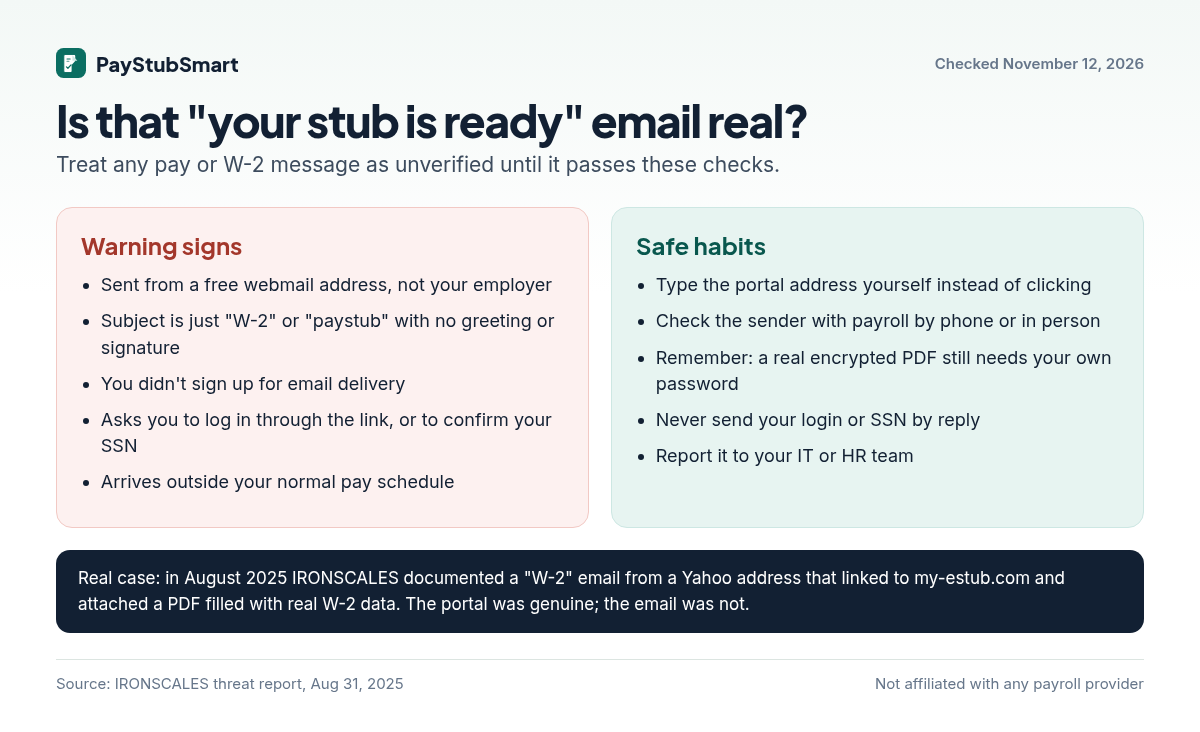
Don’t judge an email by its link. Judge it by who sent it and whether you were expecting it, and open the portal by typing its address yourself.
A real link proves nothing. In an August 2025 case documented by the email-security firm IRONSCALES, an email from a free Yahoo address had the subject line “W-2” and a link to the genuine my-estub.com. Attached was a PDF filled with real W-2 data, including a partly visible Social Security number. The link scanned as clean because the site was real. The danger was the request around it.
Frequently asked questions
Is my-eStub available in Spanish?
Yes. The my-estub.com sign-in page has an English | Spanish switch.
Do I need an email address to use my-eStub?
No, according to one employer’s setup guide. Without one, though, the Recover Password tool can’t send you a reset, so add an email in User Setup if you can.
Can I update my phone number or email on my-eStub?
Yes. Change them under User Setup and click Save Changes at the bottom of the page.
When do W-2s show up on my-eStub?
For employers that use its electronic tax form service, no later than the IRS deadline. For 2025 forms the site gave that date as February 2, 2026.
Is PayStubSmart part of my-eStub or PaperlessPay?
No. We can’t reach your account, reset your password, or issue stubs for your employer.
Sources we checked (November 12, 2026)
- my-estub.com sign-in page: operator (PaperlessPay Corporation), language switch, and the tax-form date notice.
- PaperlessPay employee support: Employee Portal, first-deposit rule, lockout after 5 tries, printing, tax-form consent steps, User Setup, chat hours.
- An employer’s my-eStub setup guide (TIG): User ID format, security questions, delivery and text options, and email being optional.
- HealthTrust: accessing tax documents: the HR portal eStub opt-in and the former-employee eStub site.
- FirstHealth: accessing pay statements in ADP: older stubs staying on the E-Stub site after the switch.
- U.S. Department of Labor: Are pay stubs required?
- New York DOL Wage Theft Prevention Act FAQ (question 28).
- California Labor Commissioner opinion letter, July 6, 2006 and California Labor Code section 226.
- IRS Publication 15-A (2026): consent to electronic Forms W-2.
- IRS General Instructions for Forms W-2 and W-3 (2026): what Box 1 excludes.
- IRONSCALES: W-2 tax form lure (August 31, 2025).
Disclaimer: PayStubSmart isn’t affiliated with, endorsed by, or connected to PaperlessPay Corporation, ADP, Paychex, Workday, UKG, HCA Healthcare, HealthTrust, FirstHealth, or Money Network. We use their names only to identify the services. Portals change. If an official page differs from this guide, follow the official page and let us know. This is general information, not legal or tax advice.
One Comment