
Dollar General Pay Stubs in 2026: Pay Stub Portal, DGme, W-2s and Former Employee Access
Short answer
Dollar General pay stubs are on Money Network’s Pay Stub Portal at paystubportal.com/dollargeneral. After a recent update, the portal asks every employee to register again, even people who already had an account. If the sign-up or a reset fails, call the Employee Resource Center (ERC) at 1-888-237-4114.
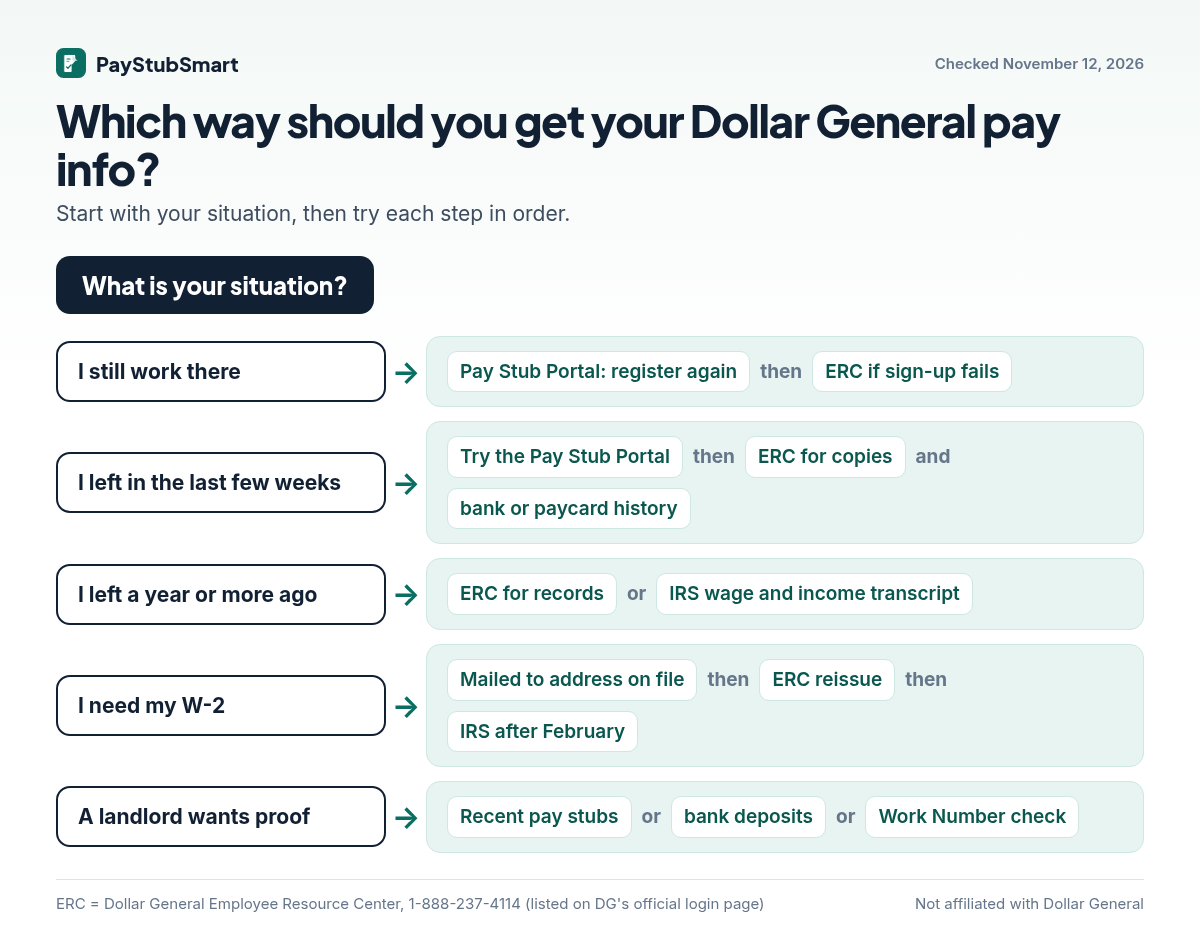
Which route should I use for my situation?
It depends on whether you still work there and on what you need to prove. Find your row below and work left to right.
| Your situation | Try first | If that fails | Good to know |
|---|---|---|---|
| Still employed | Register again on the Pay Stub Portal | ERC | Your DG login and the portal login are separate accounts |
| Left in the last few weeks | Register on the portal as soon as you can | ERC for copies; bank or paycard history meanwhile | Save PDFs of everything the day you get in |
| Left a year or more ago | ERC for specific pay periods | IRS wage and income transcript for yearly totals | A transcript shows totals, not individual weeks |
| Need a W-2 | Check the mail sent to your old address | ERC reissue, then IRS after February | Update your address before you leave |
| Landlord or lender wants proof | Recent stubs or bank deposits | Ask whether they use The Work Number | See what each document proves, below |
How do I sign up for the updated Pay Stub Portal?
Choose Register Now, confirm three identity details, then set up fresh login details. This is what the official page showed on November 12:
- Type paystubportal.com/dollargeneral into the address bar yourself. Don’t use an ad or a texted link.
- Click Register Now, under “First visit?”
- Enter your Employee ID, your birth date as MMDD (June 12 is 0612), and the last 3 digits of your Social Security number.
- Follow the prompts to pick a new User ID and password. Note the User ID somewhere safe. That’s the part people forget.
- Open the pay period you need and save a PDF if the portal offers one. If there’s no download button, your browser’s print dialog can save the stub as a PDF instead.
Those three details belong only on paystubportal.com. A site that asks for them to “find your stub” for you is not Dollar General.
Where do I find my Employee ID?
Use the “look it up here” link on Dollar General’s DG User Login page (websso.dolgen.net), or ask your store manager. Onboarding paperwork usually shows it too.
Why doesn’t my DG password work on the pay stub site?
Because they are two different accounts. The DG User Login at websso.dolgen.net (Employee ID or DG Work Account) opens DGme, the company’s Workvivo-based employee hub. The Pay Stub Portal has its own User ID and password, run by Money Network.
DGme is available as a website and through the Workvivo app, signed into with your DG credentials. You don’t need DGme to reach your stubs if you go straight to the portal. We could not see DGme’s internal menus from outside, so we don’t list click paths for it.
What should I try when I can’t log in?
Match what you see to the right fix below. If none of these work, call the ERC at 1-888-237-4114.
| What happens | Likely reason | What to try |
|---|---|---|
| An old portal login is rejected | The account predates the update | Register Now and create new details |
| Sign-up won’t accept your details | Typo, or the birth date isn’t MMDD | Re-enter slowly; four digits for the date |
| Forgot which User ID you picked | Common after re-registering | “Forgot your User ID” on the portal |
| Your DG password fails on the portal | Wrong account | Use your portal password, or reset it there |
| The page keeps reloading or freezing | Saved autofill or an old session | Private window, autofill off, try again |
What should I have ready before calling the ERC?
- Employee ID, store number, and your start and last-worked dates
- Which site failed (paystubportal.com or the DG User Login) and the exact wording of the error
- A screenshot of the error with the date and time. A specific report gets routed faster than “it doesn’t work”
- The pay periods or tax year you need, and your current mailing address
- Something to write down the case or ticket number
- Never read out your password. No legitimate helpline needs it
How do former employees get stubs and W-2s?
Try registering on the portal first. If you’re turned away, ask the ERC for the specific pay periods or a W-2 reissue. We found no official statement on how long access lasts after you leave, so if you’re still employed and planning to go, download the stubs you’ll need now.
If you were paid on a Money Network paycard, Dollar General’s ePay FAQ says DG deposits stop after your final pay but the account can stay open. Its transaction history is a dated record of each deposit.
When should each document show up?
| Document | When | If it’s missing |
|---|---|---|
| Pay stub | Each pay period, on the Pay Stub Portal | Re-register, then ERC |
| Form W-2 | Employers must furnish it by January 31. For tax year 2025, the IRS said to follow up if it hadn’t arrived by February 2, 2026 | Ask the ERC for a reissue to your current address |
| IRS help with a W-2 | After you’ve asked the employer and it still hasn’t come by the end of February | Call 800-829-1040. The IRS contacts the employer and sends Form 4852 |
| IRS wage and income transcript | Current-year W-2 data generally appears in the first week of February, and may be incomplete at first | Check again later; it only lists forms the employer has filed |
If the deadline is close and the W-2 still isn’t there, Form 4852 lets you file with your best figures. If the real W-2 arrives later with different numbers, you amend with Form 1040-X.
Which document proves what?
Each document answers a different question, so ask the landlord or lender what they actually want to confirm.
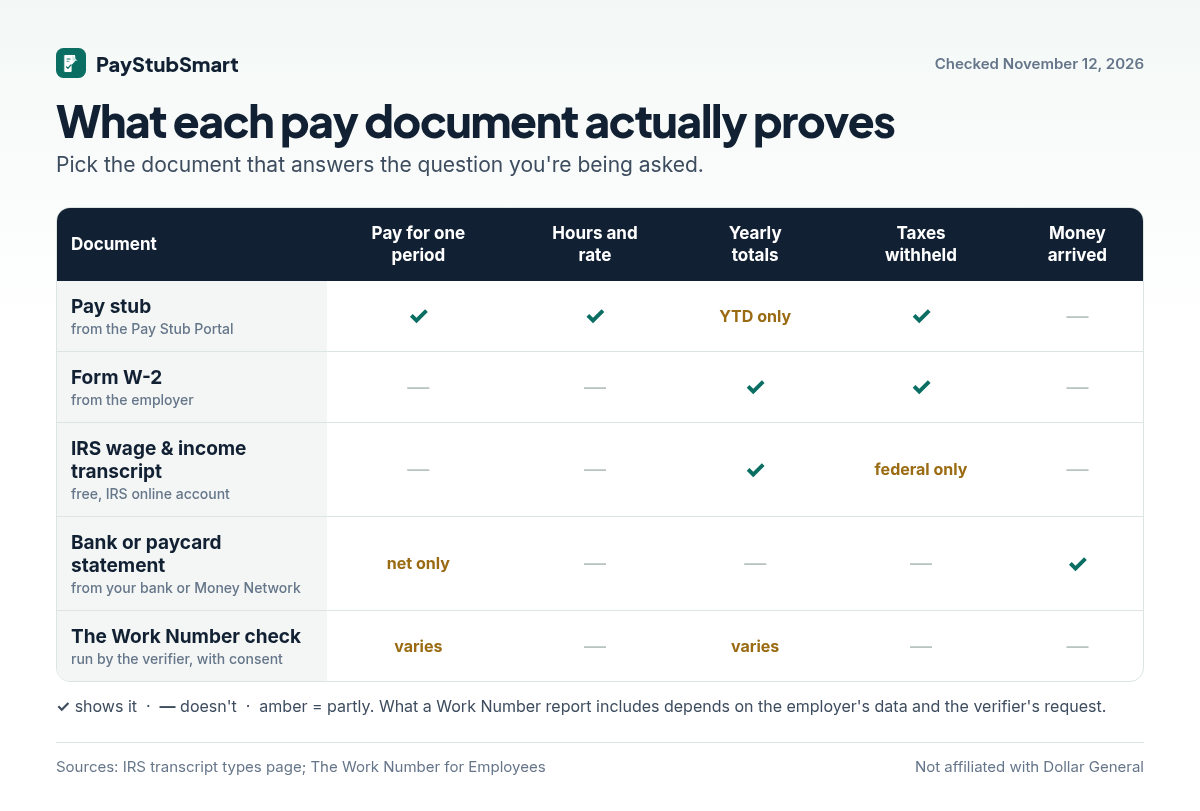
- Recent pay for an apartment: the last two or three stubs, or bank statements showing the deposits.
- Last year’s income for a loan: your W-2, or a free IRS transcript from your IRS online account. The IRS says a tax return transcript usually meets mortgage lenders’ needs.
- A W-2 you think is wrong: compare it with the wage and income transcript. That shows what the employer actually reported to the IRS, and you can ask the employer for a corrected form.
- Verification without paperwork: many verifiers check The Work Number directly, with your consent. You can create a free account there to see what’s on file and who has requested it.
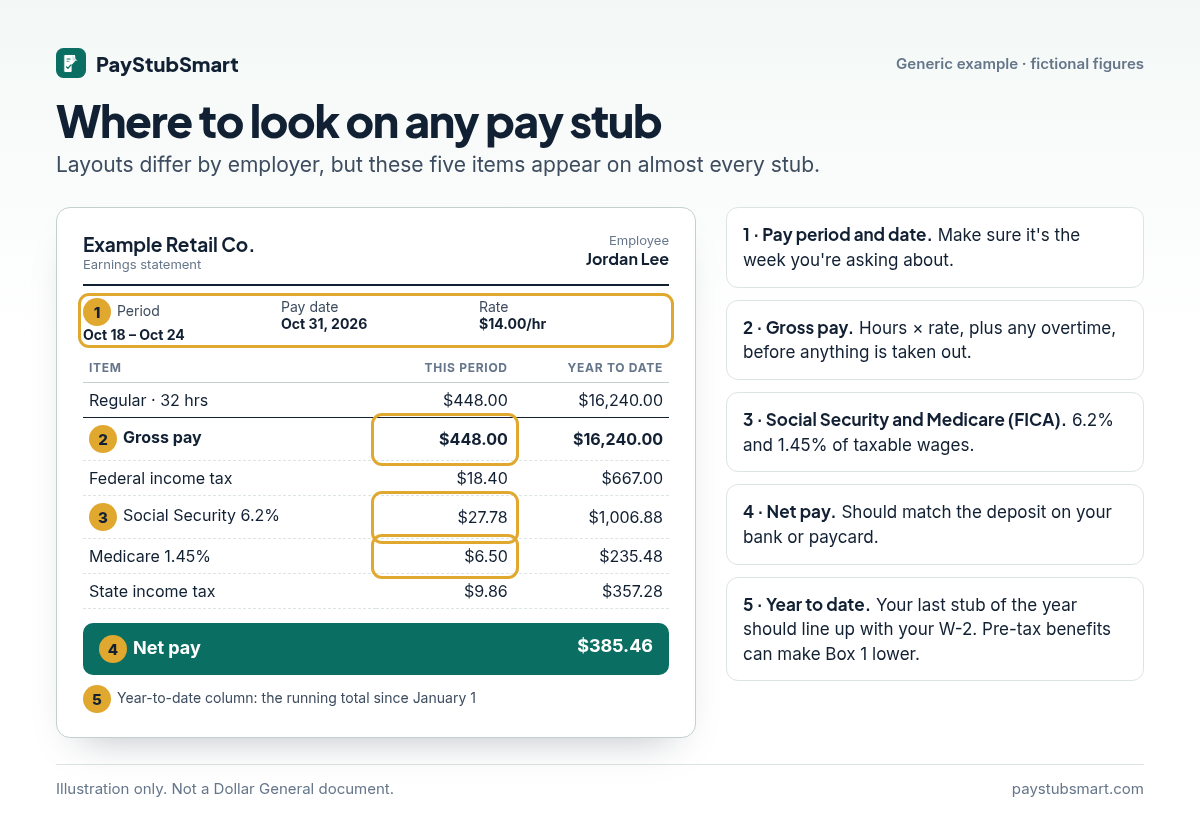
How do I check a stub once I have it?
Check four things: hours times rate equals gross, the Social Security and Medicare lines, net pay against your deposit, and the year-to-date column.
To sanity-check the federal withholding, put your pay into our take-home pay calculator. It is an estimate, not your official payroll figure, but a large gap is worth raising with the ERC.
Some readers are on the other side: they pay a nanny, a caregiver, or a part-time helper and need to hand over a clear record. PayStubSmart’s free pay stub generator is built for that, for wages you actually paid. It isn’t a way to recreate a Dollar General statement. Only Dollar General’s payroll can issue one, and a homemade copy shown as an employer document can be treated as fraud.
How do I avoid fake DGme login pages?
Before typing anything, check that the address ends in paystubportal.com, dolgen.net, or dollargeneral.com. Domains that just contain “dgme” are run by third parties.
If you already typed your details into one, change your passwords on the real sites, tell the ERC, and follow the checklist at IdentityTheft.gov.
Frequently asked questions
Can I open the Pay Stub Portal on my phone?
Yes. It’s an ordinary website, so a phone browser works. Use the same paystubportal.com address.
Is it safe to enter the last 3 digits of my SSN?
On paystubportal.com, yes. That’s one of the three details its official sign-up form asks for. Don’t enter it anywhere else.
What if the numbers on my W-2 look wrong?
Ask Dollar General for a corrected W-2 through the ERC. If it isn’t fixed by the end of February, the IRS can help at 800-829-1040.
Does the ePay paycard have its own login for stubs?
Dollar General’s ePay FAQ sends paycard holders to the same paystubportal.com address to check their balance.
Can a new employer verify my Dollar General job without my stubs?
Often, yes. Verifiers commonly use The Work Number. See which document proves what.
Is PayStubSmart connected to Dollar General?
No. We can’t access Dollar General systems, reset passwords, or issue Dollar General documents.
Sources we checked (November 12, 2026)
- Money Network Pay Stub Portal for Dollar General: re-registration notice, sign-up fields, and the reset links.
- Dollar General “DG User Login”: Employee ID lookup, DG Work Account option, and ERC 1-888-237-4114.
- Dollar General ePay FAQ: the Money Network paycard, the paystubportal.com balance link, and what happens after you leave.
- Dollar General HR page on DGme by Workvivo (dollargeneral.com/hr/workvivo): app sign-in with DG credentials. The site blocked our automated visit, so we relied on its indexed text.
- IRS Topic no. 154: missing or incorrect W-2s and Form 4852.
- IRS transcript types and Topic no. 159: when wage and income data appears, and which transcript lenders use.
- The Work Number for employees: account setup and seeing your data.
Disclaimer: PayStubSmart is not affiliated with, endorsed by, or connected to Dollar General Corporation, Dolgencorp, Money Network, Workvivo, or Equifax. Names are used only to identify the services. Portals and phone numbers change. If an official page differs from this guide, follow the official page and tell us. General information, not legal or tax advice.
One Comment